Bipedal Robot RL Simulation on Jetson Orin Nano
Training a two-legged robot to walk using PPO and the Genesis physics simulator, running entirely on the Jetson Orin Nano.
Note
This post walks through rylanpeng/jetson-orin-nano-two-leg-robot-simulation, built with the help of Copilot. PyTorch must already be installed on the device (see 3-pytorch.md if you haven't done that yet).
References
1. Clone the repo
$ git clone git@github.com:rylanpeng/jetson-orin-nano-two-leg-robot-simulation.git
$ cd jetson-orin-nano-two-leg-robot-simulation
2. Install Python dependencies
Note
uv sync pulls torch from the NVIDIA Jetson wheel pinned in pyproject.toml under [tool.uv.sources], so it won't accidentally install the wrong architecture. Make sure UV_SKIP_WHEEL_FILENAME_CHECK=1 is set in your shell (see 3-pytorch.md).
3. Patch Genesis for Jetson
Run this once after every uv sync:
Expected output:
  [+] Added 'import re' to .venv/lib/python3.10/site-packages/genesis/utils/misc.py
  [+] Patched version parsing in .venv/lib/python3.10/site-packages/genesis/utils/misc.py
  [+] Patched version parsing in .venv/lib/python3.10/site-packages/genesis/__init__.py
Done.
If you see [=] Already patched or no match, the patch was already applied, nothing to do.
Why is this needed?
Genesis 0.4.0 parses the PyTorch version string using int():
On Jetson, torch.__version__ is 2.5.0a0+872d972e41.nv24.08. After the replace and split, the first three elements are ['2', '5', '0a0'], and int('0a0') raises a ValueError.
The patch replaces these calls with a regex that extracts only the numeric parts:
4. Train
Default training runs 500 iterations and saves checkpoints every 100.
Logs and checkpoints are saved under logs/exp_<timestamp>/. A logs/latest symlink always points to the most recent run.
You can customize the run:
# Custom log prefix and longer run
$ uv run python -m two_leg_robot.train --log_dir my_experiment --iterations 1000
The console prints a table after each iteration:
################################################################################
                           Learning iteration 200/200

                            Total steps: 3276800
                       Steps per second: 10407
                        Collection time: 0.787s
                          Learning time: 0.787s
                        Mean value loss: 0.0051
                    Mean surrogate loss: -0.0071
                      Mean entropy loss: 10.2962
                            Mean reward: 14.21
                    Mean episode length: 931.53
                  Mean action noise std: 0.88
      Mean episode rew_tracking_lin_vel: 0.8296
      Mean episode rew_tracking_ang_vel: 0.1431
             Mean episode rew_lin_vel_z: -0.0481
           Mean episode rew_base_height: -0.0091
           Mean episode rew_action_rate: -0.1210
    Mean episode rew_similar_to_default: -0.0662
--------------------------------------------------------------------------------
                         Iteration time: 1.57s
                           Time elapsed: 00:05:29
Monitor training in TensorBoard:
Open http://localhost:6006 in a browser. The Train/mean_reward curve should trend upward as the robot learns to follow velocity commands.
5. Evaluate
Evaluation loads the most recent checkpoint from logs/latest:
To load a specific run and checkpoint:
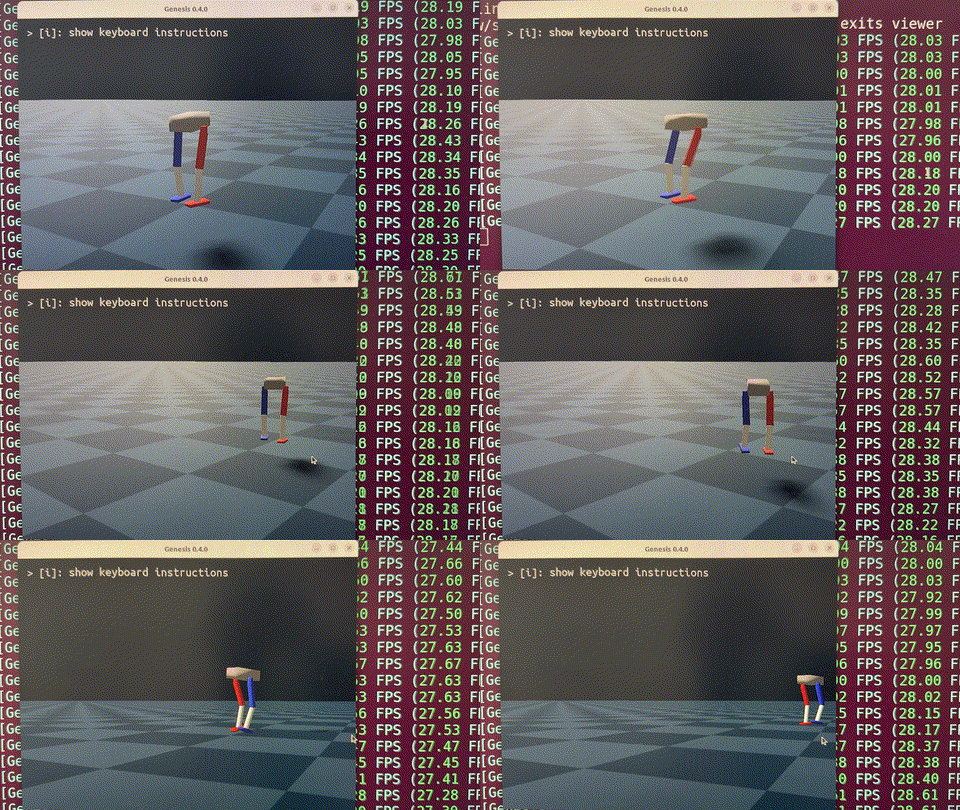
The viewer opens and shows the robot walking under randomly sampled velocity commands.
6. Teleoperate
Drive the robot manually using the keyboard:
Controls:
| Key | Action |
|---|---|
w / s | Forward / backward |
a / d | Strafe left / right |
q / e | Yaw left / right |
ESC | Exit viewer |
Result
TensorBoard
All training metrics are logged under logs/<run_name>/ and viewable in TensorBoard:
Key panels to watch:
- Train/mean_reward: the main signal. Should trend up. If it plateaus early, the reward scales or network capacity may need tuning.
- Loss/surrogate: the PPO policy gradient loss. Should decrease and stabilize.
- Loss/learning_rate: the adaptive KL controller adjusts this automatically. Large oscillations suggest unstable training.
- Policy/mean_noise_std: exploration level. Should decrease gradually as the policy converges.
- Episode/rew_*: per-reward-term breakdowns. Useful for diagnosing which terms are dominating or conflicting.